Edge-to-Edge CollectionView Scrolling on iPhone Duo
This article is more than two years old. Some details may have changed, so check the current documentation before applying them.
While testing a .NET MAUI app on the iPhone Duo simulator, one change immediately stood out: the title scrolled out of the way.
In my app, the regular-sized title stayed put on a regular iPhone. On Duo, it scrolled out of the way without any special scroll configuration, and the list moved up with it. Almost all of the space was reclaimed, but small gaps of a few pixels remained at both the top and bottom.
Those gaps were the problem. The list already followed the title bar; I wanted it to finish the journey and reach the screen edges, without sacrificing the safe position of the first item when the page opened.
True edge-to-edge scrolling. Easier said than done.
One setting, two almost-correct results
The obvious place to start was SafeAreaEdges. Changing the top edge of the page gave me two different problems.
None: the first item starts under the title
With the top safe-area edge set to None, the CollectionView could extend behind the title bar. That overlap is useful while scrolling, as later items can pass behind the title as it disappears.
The title bar literally overlapped the CollectionView. Item 1 and the following items started underneath it and stayed hidden there; scrolling didn’t bring them into view. The list reached the edge, but its first items were obscured by the title.
Container: gaps remain
Setting the top edge to Container protected the first item. The page looked right when it opened.
Then I scrolled. The list moved up as the title bar disappeared, but small gaps remained at both the top and bottom of the screen. Not really edge-to-edge. My OCD wasn’t going to let a few pixels slide.
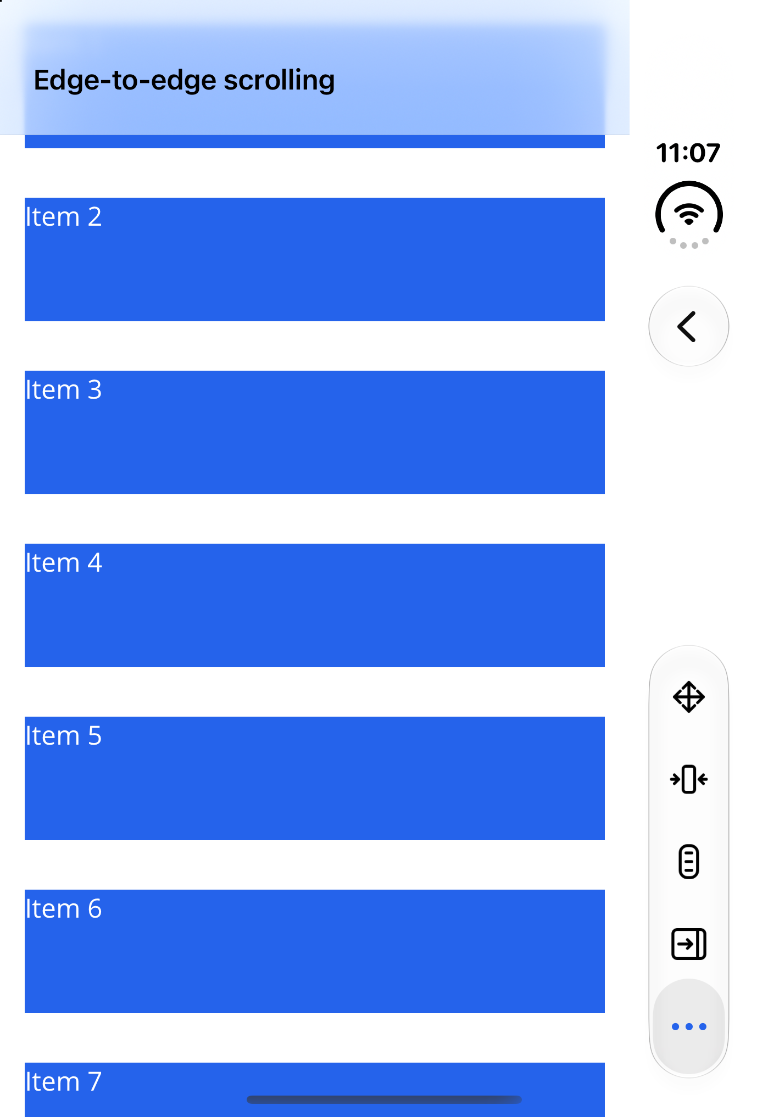
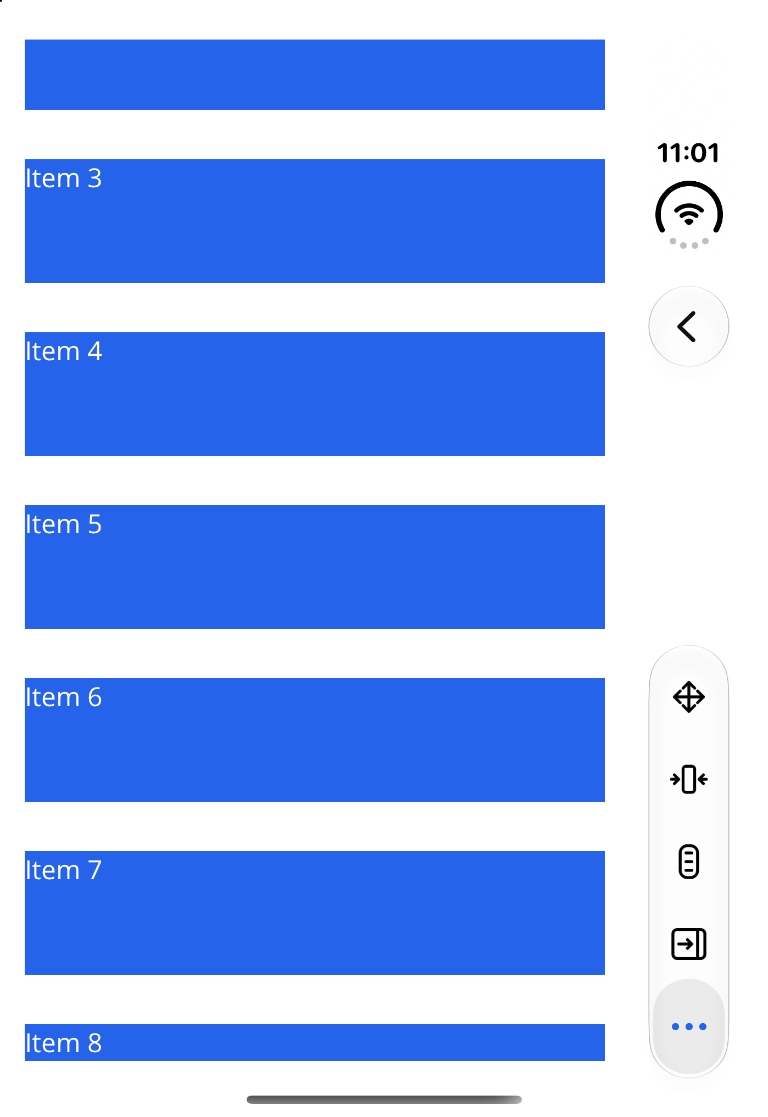
The viewport should reach the edge. The first item should not.
Those requirements sound contradictory until we separate two things:
- The viewport is the visible area through which the list scrolls. It should extend behind the system bars.
- The content insets give the scrollable content a safe starting and ending position inside that viewport.
Insets are part of the scroll mechanism, it’s not a permanent margin outside the list. The first item can start below the title while later items scroll behind it. When the title moves away, the viewport is already there to fill the space.
UIKit can do this with automatic inset adjustment. There is no need to guess the title bar’s height or update a margin on every scroll event. The native scroll view needs the correct safe-area information.
Where the information was missing
MAUI sets the native CollectionView’s ContentInsetAdjustmentBehavior to Never. I thought switching it to Automatic would be an easy fix, but that alone wasn’t enough.
What followed was a longer-than-expected debugging session with Copilot, tracing how MAUI and UIKit handle safe areas.
In my test, the page knew how much space to leave for the system bars, but the native collection view wasn’t getting the information it needed to do the same. As a result, turning on automatic insets still left the first item behind the title.
MAUI’s iOS collection view handler creates a native controller and uses its view for the CollectionView. The handler doesn’t itself attach that controller as a child of the page’s controller. Without a parent controller to forward the appearance notification, UIKit wasn’t getting the signal it needed. Once I sent that notification explicitly, UIKit could calculate the inset needed to keep the first item clear of the title.
There was one more piece: allowing the page layout to extend behind opaque bars as well. Together, these changes let UIKit position the content while the list itself reaches the edge, without hard-coded bar heights or scroll-dependent margins.
The fix, without hand-wiring the controller
Once Copilot and I understood the problem, I wanted to implement it and make it reusable. The reusable fix is now available in DuoExtensions.Maui. Its UseEdgeToEdgeCollectionView() opt-in registers a custom iOS CollectionView handler. There is a little native boilerplate in the handler to put the pieces in place:
- When the handler connects, it switches the native collection view to automatic content inset adjustment.
- When the view loads, it configures the collection controller and the owning controller to allow layout behind opaque bars, including the top edge.
- If the collection controller has no parent controller, it sends a paired appearance transition so UIKit can establish its safe-area information. If it already has a parent, the handler leaves appearance forwarding to that hierarchy.
- When the view unloads or the handler disconnects, it balances any appearance transition it started and restores the owning controller’s previous layout settings.
The handler does the UIKit plumbing; UIKit still calculates the adjusted content insets. For the full details, see the handler implementation.
First, add the package:
dotnet add package DuoExtensions.MauiThen opt in to the handler in MauiProgram.cs:
using DuoExtensions.Maui;

builder
    .UseMauiApp<App>()
    .UseEdgeToEdgeCollectionView();
This is a separate opt-in; UseDuoExtensions() does not enable it automatically. The handler applies to all iOS CollectionView controls in the app. If your app already registers a custom CollectionView handler, combine the implementations rather than registering a second one.
Keep the CollectionView as the page’s direct content, and let the page extend vertically behind the bars:
<ContentPage
    ...
    SafeAreaEdges="Container, None"
    BackgroundColor="White"
    Shell.BackgroundColor="Transparent">
    <CollectionView BackgroundColor="Transparent" ...>
        ...
    </CollectionView>
</ContentPage>
SafeAreaEdges="Container, None" keeps the horizontal container safe area and removes the page’s vertical safe area. UIKit’s automatic insets then keep the scrollable content safely positioned inside the extended viewport.
The package’s edge-to-edge implementation is for iOS CollectionViews. A page with a standard ScrollView works as expected when setting the SafeAreaEdges appropriately, without needing the custom handler.
Try it out
The edge-to-edge handler is part of DuoExtensions.Maui on NuGet.
The README has the setup details, and the demo app includes an Edge-to-Edge example. The library is an experiment, so if you run into an unexpected layout or lifecycle issue, open an issue with your MAUI, iOS and Xcode versions and steps to reproduce it.
Did you enjoy reading this? If my work has saved you time or taught you something new, consider buying me a coffee.
Join the discussion